Kubernetes job monitor
0Kubernetes is an awesome container orchestration platform. One of the features it provides is the ability to configure Kubernetes cron jobs. The cron jobs will periodically create jobs (executions). Out of the box there is not so much monitoring available for the cron jobs.
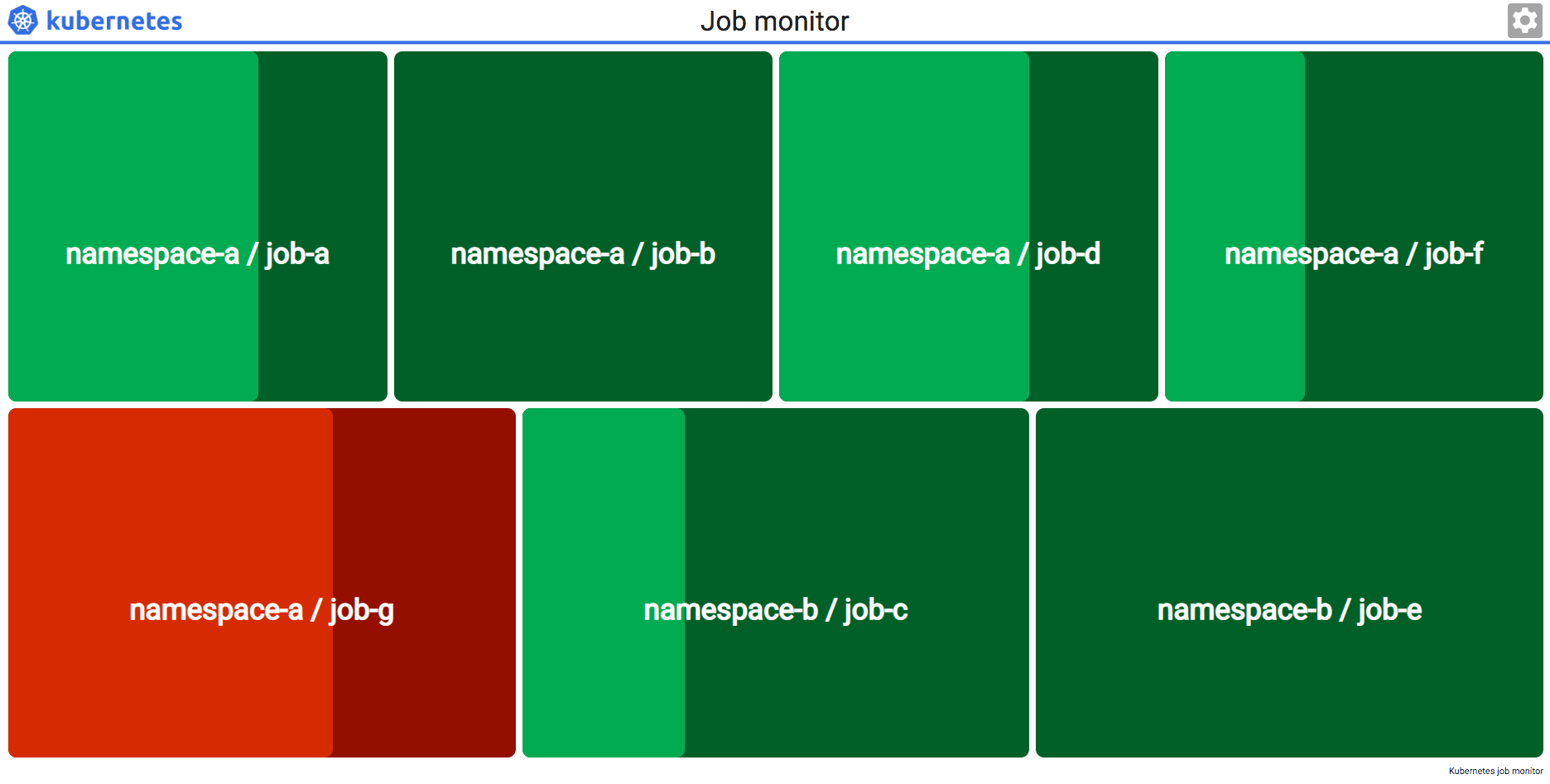
I created a Kubernetes job monitor dashboard that makes it easy to see which jobs are running and if their latest status was “succeeded” or “failed”.
The Kubernetes job monitor is also mentioned in the official Kubernetes documentation https://kubernetes.io/docs/tasks/debug-application-cluster/resource-usage-monitoring/#kubernetes-job-monitor.

StackStorm job monitor
0StackStorm is a great automation tool. In general it exists of workflows and actions. Actions can have rules and have for example the trigger type “core.st2.CronTimer“.
If you have a lot of these it’s nice to have a dashboard which shows the latest status of the executed action. But it’s also nice to see which actions are running. Take a look at the StackStorm job monitor dashboard I created for this.

Jenkins Amazon ECR token update
0With the use of the Jenkins Docker Pipeline plugin, it’s easy to build and push Docker images.
For example, building in a Jenkinsfile:
script {
    dockerImage = docker.build("${env.DOCKER_IMAGE_TAG}",  "${args}")
}
And push:
script {
    docker.withRegistry("${env.DOCKER_PRIVATE_REGISTRY_URL}",
            "docker-private-registry-${env.DEPLOY_ENVIRONMENT}") {
        dockerImage.push("${env.DOCKER_IMAGE_SHORT_PUSH_TAG}")
    }
}
The Docker registry username and password are provided by the credential ID “docker-private-registry-${env.DEPLOY_ENVIRONMENT}”. However Amazon ECR uses tokens that are only valid for 12 hours. So the password that you specify when creating the credential will only work in the example above for a short period of time.
With the following script it’s More >

Trigger Jenkins multibranch pipeline with curl or webhook
0
Git branch source
Jenkins jobs that use the widely used git plugin, can be triggered remotely with curl or a webhook. The job must have the option “Poll SCM” enabled. That’s all to enable push triggers, no timer has to be configured. Jobs are only executed if there is an actual source code change. Off course you can configure a timer, if you also want a periodic pull.
An example curl commando to trigger all jobs that have configured the repository URL “ssh://git@bitbucket.mycompany.example/demo/my-api.git” in Git SCM and have “Poll SCM” enabled:
curl 'http://jenkins.mycompany.example/git/notifyCommit?url=ssh://git@bitbucket.mycompany.example/demo/my-api.git' --user 'jenkins-trigger:mysecrettoken123'
Jenkinsfile Docker pipeline multi stage
0Using a Jenkinsfile to configure the Jenkins build job for source code is great. Jenkins has a very nice Docker Pipeline plugin that makes it possible to execute docker commands nicely during the build.
Note: Don’t forget to read on this page the update of 16 august 2018.
However, a lot of the examples at https://jenkins.io/doc/book/pipeline/docker/ keep it very simple. They start and stop in one pipeline stage, with methods like docker.inside or docker.withRun. For example, building a container, running it, executing commands in it and destroy it, all within one stage. For several use More >

Minikube NFS mounts
2
Minikube is great for having a Kubernetes cluster as local Docker development environment. In a development workflow you probably have source code on your host machine and it would be great if the Docker containers in the Kubernetes cluster could mount this. So changes made to the code can be tested and are visible quickly. The steps on this blog post are tested with Minikube version v0.28.0.
Mounting is possible for example with:
And by using hostPath in the volume.
---

Rolling upgrade Elasticsearch, Couchbase and CouchDB
0For a client I automated the patching process of Linux operating systems and middleware. I create a python action for that in StackStorm. The script retrieved all servers from the CMDB and patched per data center.
Non cluster hosts parallel
All non cluster hosts where patched in parallel with the Python ParallelSSHClient.
Cluster hosts rolling upgrade
For hosts in a cluster it’s a bit harder. The minimum amount of nodes in a cluster is most of the time 3 and only one node can be down without downtime of the cluster. So a rolling upgrade is More >